Construction Shapes Area Calculator – Calculate Floor Area for Rooms & Complex Shapes
🏗️ Construction Shapes Calculator auto · 10 shapes
Why Use a Construction Shapes Calculator?
The Construction Shapes Calculator is a specialized tool designed to help architects, contractors, DIY enthusiasts, and students quickly calculate the area of complex construction-related shapes. Unlike standard area calculators that only handle basic geometric forms, this tool focuses on shapes commonly encountered in building design, floor planning, and construction projects.
Accurate area calculations are essential for:
- Material estimation: Determine how much flooring, paint, or concrete you need
- Cost planning: Create accurate project budgets based on square footage
- Space optimization: Make informed decisions about room layouts and furniture placement
- Building code compliance: Ensure your designs meet minimum space requirements
How to Use the Construction Shapes Calculator?
Step 1: Select Your Shape
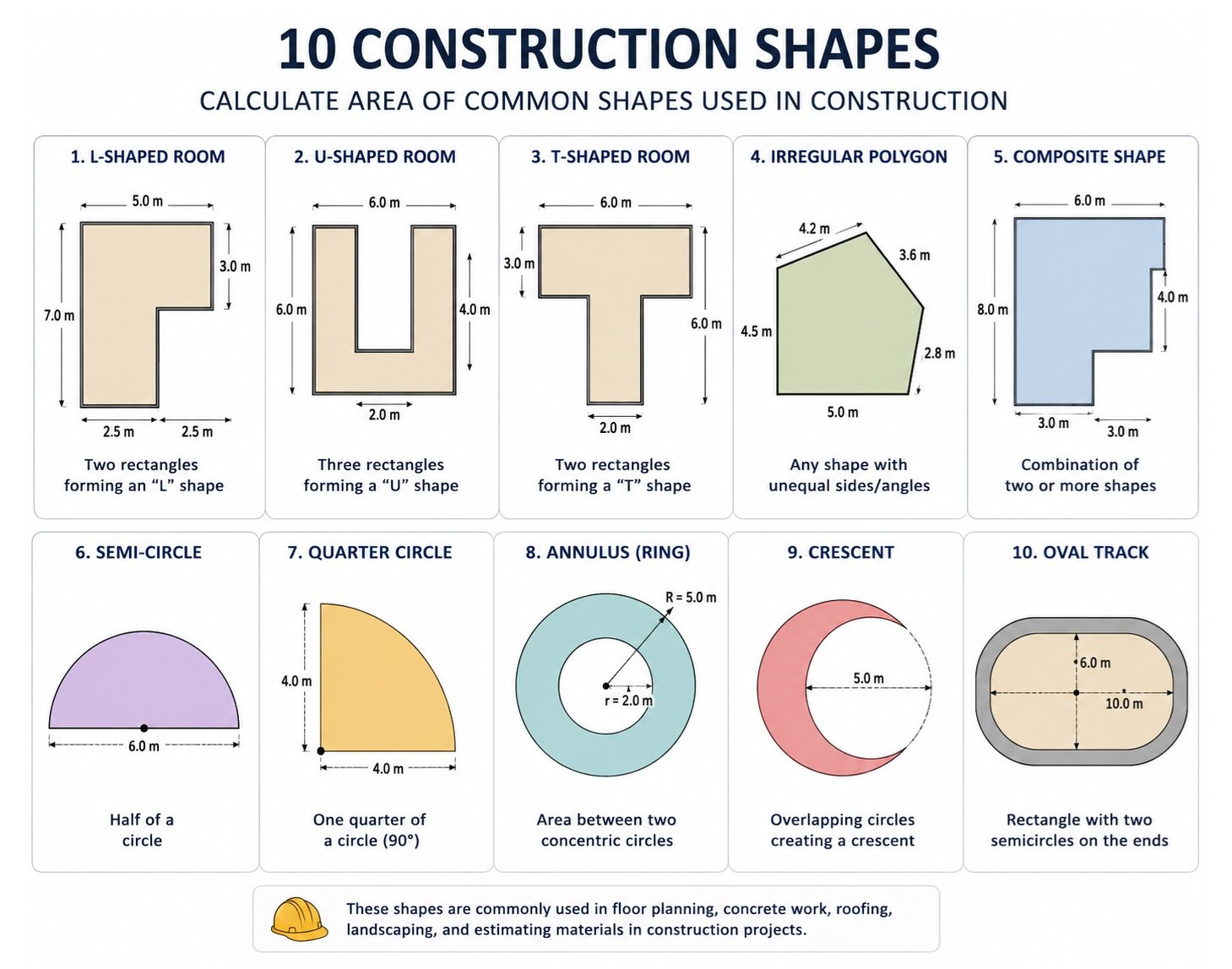
The calculator features 10 construction-specific shapes to choose from.
- L‑shaped room: Perfect for kitchens, hallways, and irregular room layouts
- U‑shaped room: Common in bathroom designs and kitchen counter layouts
- T‑shaped room: Frequently found in office spaces and open floor plans
- Irregular polygon: For rooms with four unequal sides
- Composite shape: Combines rectangles and circles for complex areas
- Semi‑circle: Used for bay windows, apses, and rounded room extensions
- Quarter circle: Common in corner designs and circular staircases
- Annulus (Ring): Ideal for circular walkways, patios, and donut-shaped spaces
- Crescent: For moon-shaped gardens, plazas, or curved architectural features
- Oval Track: Perfect for running tracks, elliptical pools, and oval-shaped rooms
Step 2: Enter Your Measurements
Once you select a shape, the calculator displays the specific dimensions needed for that shape.
- L‑shaped room: Enter Length A, Width B, Length C, and Width D
- U‑shaped room: Provide Outer Width, Outer Height, Thickness, and Inner Width
- T‑shaped room: Input Top Width, Top Height, Stem Width, and Stem Height
- Irregular polygon: Enter all four side lengths (Side 1–4)
- Composite shape: Provide Rectangle Width, Rectangle Height, and Circle Radius
- Semi‑circle & Quarter circle: Enter the Radius
- Annulus: Input Outer Radius and Inner Radius
- Crescent: Provide Large Radius, Small Radius, and Distance between centers
- Oval Track: Enter Semi‑axis A, Semi‑axis B, and Track Width
Step 3: Choose Your Unit of Measurement
This calculator supports five common measurement units:
- Centimeter (cm): Ideal for small-scale projects and detailed measurements
- Inches (in): Perfect for US construction projects and smaller spaces
- Feet (ft): Most common unit for room dimensions and building plans
- Meters (m): Standard unit for international construction projects
- Yards (yd): Useful for landscaping and outdoor projects
The calculator will display your results in the same unit you select, with the appropriate squared notation (e.g., ft², m²).
Step 4: Read Your Results
The area calculation happens instantly, and your results appear in the blue result box at the bottom of each shape panel:
- Auto-calculation: The area updates with every keystroke
- Unit consistency: Results are shown in your selected unit squared (cm², in², ft², m², yd²)
Precision: Values are displayed with appropriate decimal places (2 decimals for larger numbers, 4 decimals for smaller measurements)
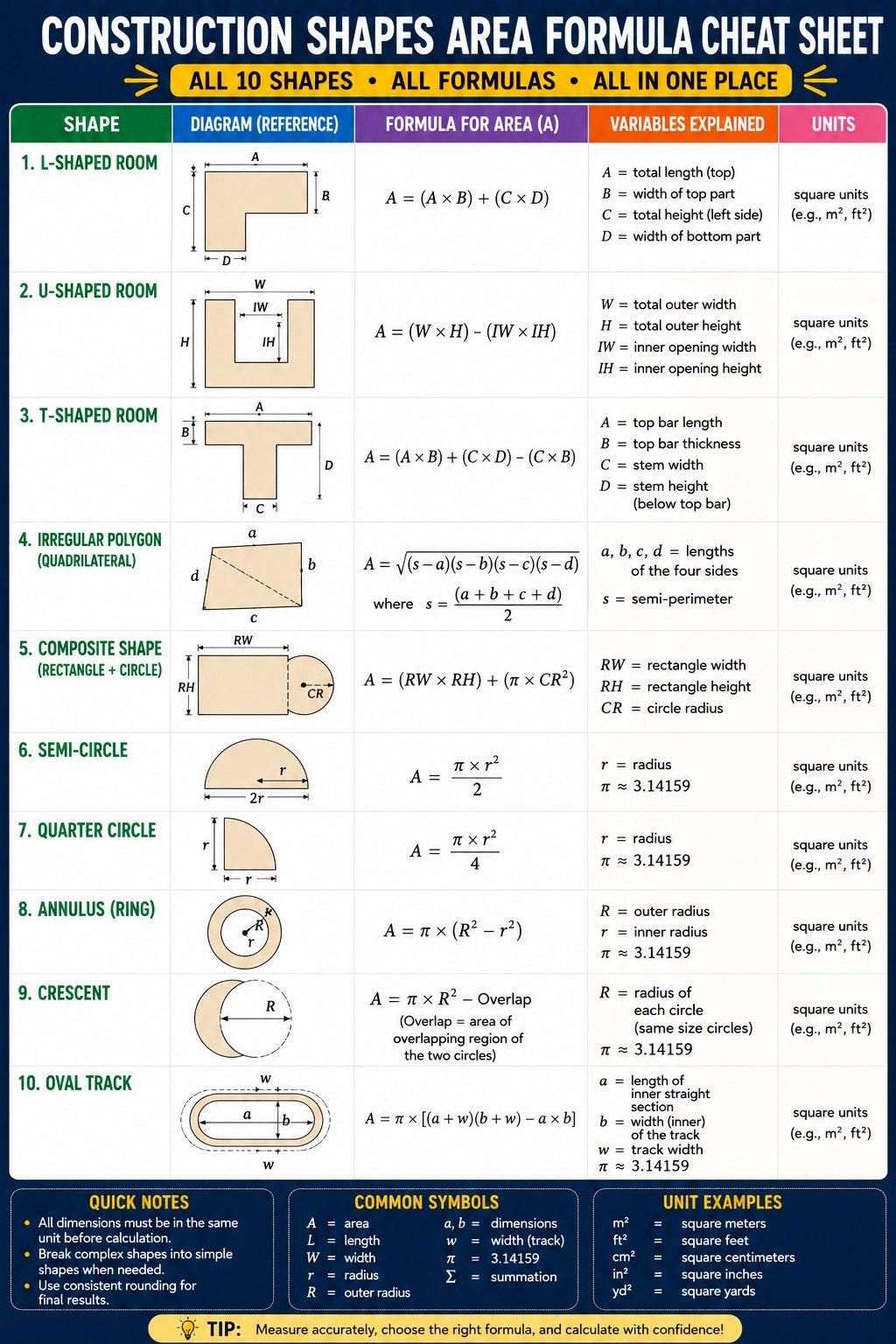
Area Calculation Formulas Used in the Construction Shapes Calculator
L‑Shaped Room
Formula:
Area = (A × B) + (C × D) Variables:- A = Length of the first rectangle
- B = Width of the first rectangle
- C = Length of the second rectangle
- D = Width of the second rectangle
U‑Shaped Room
Formula:
Area = (W × H) – (IW × IH) Where:- IH = H – T IW = (if inner width provided) IW : (W – 2 × T)
- W = Outer width
- H = Outer height
- T = Thickness (wall or leg width)
- IW = Inner width (gap between legs)
- IH = Inner height
T‑Shaped Room
Formula:
Area = (A × B) + (C × D) – (C × B)
Variables:
- A = Top width
- B = Top height
- C = Stem width
- D = Stem height
Explanation: A T‑shaped room consists of two rectangles (top and stem) with an overlapping section. The formula adds both rectangles and subtracts the overlap (stem width × top height) to avoid double-counting.
Irregular Polygon (Quadrilateral)
Formula (Brahmagupta’s Formula):
s = (a + b + c + d) / 2
Area = √((s – a)(s – b)(s – c)(s – d))
Variables:
- a = Side 1 length
- b = Side 2 length
- c = Side 3 length
- d = Side 4 length
- s = Semi-perimeter
Explanation: This formula calculates the area of any quadrilateral (four-sided polygon) using only the side lengths. It’s based on Brahmagupta’s formula, which works for cyclic quadrilaterals and provides a good approximation for most irregular four-sided rooms.
Composite Shape (Rectangle + Circle)
Formula:
Area = (RW × RH) + (π × CR²)
Variables:
- RW = Rectangle width
- RH = Rectangle height
- CR = Circle radius
- π = Pi (approximately 3.14159)
Explanation: A composite shape combines a rectangle and a circle. The total area is the sum of the rectangular area and the circular area.
Semi-circle
Formula:
- Area = ½ × π × r² or written as: Area = (π × r²) / 2
Variables:
- r = Radius
- π = Pi (approximately 3.14159)
Explanation: A semi-circle is exactly half of a full circle. The formula divides the full circle area by 2.
Quarter Circle
Formula:
Area = ¼ × π × r² or written as: Area = (π × r²) / 4
Variables:
- r = Radius
- π = Pi (approximately 3.14159)
Explanation: A quarter circle is one-fourth of a full circle. The formula divides the full circle area by 4.
Annulus (Ring)
Formula:
Area = π × (R² – r²)
Variables:
- R = Outer radius
- r = Inner radius
- π = Pi (approximately 3.14159)
Explanation: An annulus is the area between two concentric circles. The formula subtracts the inner circle area from the outer circle area.
Crescent
Formula:
If d ≥ R + r: Area = π × (R² – r²)
Else:
Area = π × R² – Overlap
Where:
Overlap = r² × arccos((d² + r² – R²) / (2 × d × r))
+ R² × arccos((d² + R² – r²) / (2 × d × R))
– ½ × √((-d + r + R) × (d + r – R) × (d – r + R) × (d + r + R))
Variables:
- R = Large radius
- r = Small radius
- d = Distance between circle centers
- π = Pi (approximately 3.14159)
Explanation: A crescent is the area between two overlapping circles. If the circles don’t overlap (distance ≥ sum of radii), it’s simply the difference of areas. If they overlap, the formula subtracts the overlapping (lens) area from the large circle.
Oval Track
Formula:
Area = π × (a + w) × (b + w) – π × a × b
Or simplified:
Area = π × [(a + w)(b + w) – a × b]
Variables:
- a = Semi‑axis A (inner ellipse)
- b = Semi‑axis B (inner ellipse)
- w = Track width
- π = Pi (approximately 3.14159)
Explanation: An oval track is the area between an outer ellipse and an inner ellipse. The formula calculates the outer ellipse area and subtracts the inner ellipse area. Each semi-axis is increased by the track width for the outer ellipse.
Benefits of Using a Construction Shapes Calculator
Have you ever stared at an oddly shaped room and wondered how to figure out its square footage? Whether you’re a professional contractor or a homeowner planning a renovation, calculating area for irregular spaces can be frustrating and time-consuming. A construction shapes calculator solves this problem instantly, giving you accurate measurements for even the most complex layouts.
Here, we’ll explore the many benefits of using a specialized room area calculator and why it’s becoming an essential tool in the construction industry.
Save Time and Reduce Errors
Instant Calculations Without Manual Math
One of the biggest benefits of using a Floor Area Calculator is the speed it offers. Instead of spending minutes or even hours calculating areas by hand, you get results instantly. Simply enter your measurements, and the Square Footage Calculator does the rest.
Manual calculations are prone to errors. A single mistake in multiplication or addition can throw off your entire project. With a Building Area Calculator, you eliminate human error and get consistent, reliable results every time.
No More Complex Formulas to Remember
Different shapes require different formulas. Do you remember how to calculate the area of an L-shaped room? Or a crescent shape? Most people don’t. A Construction Measurement Calculator has all the formulas built in. You don’t need to memorize anything—just input your measurements and get the answer.
Handle Complex and Irregular Spaces with Ease
Perfect for Non-Standard Room Layouts
Modern buildings often feature unique designs with unusual shapes. A Complex Shape Area Calculator handles these effortlessly. Whether you have a U-shaped room, a T-shaped room, or a space with curved walls, the calculator gives you accurate results.
Calculate Irregular Shapes Accurately
Many rooms don’t fit simple geometric patterns. An Irregular Shape Calculator is designed specifically for these situations. It can handle any four-sided polygon, making it perfect for rooms with angled walls or non-perpendicular corners.
Specialized Tools for Specific Shapes
The Area Calculator for Construction includes specialized calculators for:
- L-shaped room area calculation– Perfect for kitchens and hallways
- U-shaped room area calculation– Great for bathrooms and alcoves
- T-shaped room calculation– Ideal for open-plan offices and living spaces
- Composite area calculation– For rooms with both rectangular and circular sections
- Irregular polygon area calculation– For any four-sided room
- Semi-circle area calculation– Handles bay windows and curved walls
- Quarter circle calculation– Useful for corners and circular staircases
- Annulus area calculation–Calculates ring-shaped spaces
- Ring area calculation– Perfect for circular walkways and patios
- Crescent area calculation– For moon-shaped gardens and architectural features
- Oval track area calculation– Great for running tracks and elliptical designs
Better Project Planning and Budgeting
Accurate Material Estimation
Knowing the exact area of your space is crucial for ordering materials. A Flooring area calculator tells you exactly how much flooring you need. This prevents overbuying (wasting money) or underbuying (delaying your project).
Concrete area calculator tools help you estimate concrete needs for foundations, patios, and driveways. Tile area calculator functions ensure you order the right number of tiles with minimal waste.
Precise Cost Calculations
When you know the exact area, you can calculate costs more accurately. Whether you’re estimating paint, flooring, or roofing materials, a Paint area calculator or Roofing area calculator gives you the numbers you need to create realistic budgets.
Avoid Costly Mistakes
Underestimating area can lead to project delays and unexpected expenses. Overestimating wastes money on unnecessary materials. A Construction Area Calculator gives you the precise numbers you need to order correctly the first time.
Improve Communication with Clients and Teams
Clear, Professional Documentation
A Square Footage Calculator provides clear, documented results that you can share with clients, team members, or suppliers. This transparency builds trust and ensures everyone is working with the same numbers.
Simplify Project Discussions
When you have accurate numbers, conversations about project scope and costs become much easier. Instead of estimating and guessing, you can say, “The area is exactly 245 square feet, which means we need…”
Save Money on Materials
Reduce Waste
One of the biggest benefits of using a Floor Area Calculator is reducing material waste. When you know the exact area, you only buy what you need. This is especially important for expensive materials like hardwood flooring, tiles, and stone countertops.
Bulk Ordering with Confidence
When you’re confident about your measurements, you can take advantage of bulk pricing without worrying about ordering too much or too little. A Building Area Calculator gives you the numbers you need to make smart purchasing decisions.
Lower Project Costs
Less waste means lower costs. By using a Construction Measurement Calculator, you can often reduce your material budget by 10-15% compared to projects that relied on rough estimates.
User-Friendly for Everyone
No Math Skills Required
You don’t need to be a math expert to use this tool. A Room Area Calculator is designed for everyone, from professional contractors to first-time DIYers. Simply input your numbers and let the calculator do the work.
Suitable for All Project Sizes
Whether you’re calculating the area of a small bathroom or a large commercial space, a Area Calculator for Construction handles it all. The tool works equally well for tiny renovations and massive construction projects.
Works on Any Device
Modern Construction Shapes Calculators are web-based and work on any device like desktop, laptop, tablet, or smartphone. This means you can calculate areas on-site, in the office, or at home.
Versatile for Different Construction Needs
Flooring and Tiling
A Flooring area calculator helps you determine how much material you need for any floor shape. This includes tricky spaces like L-shaped rooms or rooms with curves.
Painting and Wallpapering
A Paint area calculator gives you the square footage you need to cover. This helps you buy the right number of paint cans and avoid color-matching issues from buying multiple batches.
Concrete and Foundations
Concrete area calculator tools ensure you order the right amount of concrete for your project. This prevents expensive delays and ensures your project stays on schedule.
Roofing and Exterior Work
A Roofing area calculator helps you estimate materials for roof replacement or repair. This is essential for accurate quotes and material ordering.
Frequently Asked Questions (FAQs)
1. How do you calculate an L-shaped room?
Calculate the area by dividing the L-shaped room into two rectangles. Measure the length and width of each rectangle, calculate their individual areas using Length × Width, and then add the two values together. This method provides an accurate total floor area for flooring, painting, or material estimation.
2. How do you calculate floor area?
Floor area is calculated by measuring the dimensions of the floor and applying the appropriate geometric formula. For rectangular rooms, multiply length by width. For irregular or curved rooms, divide the space into simpler shapes such as rectangles, triangles, or circles, calculate each area separately, and then add them together.
3. What is a composite area?
A composite area is the total area of a shape made from two or more simple geometric shapes. Common examples include L-shaped, U-shaped, and T-shaped rooms, where multiple rectangles or circles are combined into one floor plan.
4. How do contractors measure rooms?
Contractors typically use tape measures, laser distance meters, and digital floor plans to measure room dimensions. They record all wall lengths, identify irregular sections, and calculate the total floor area before estimating flooring, concrete, paint, or construction materials.
5. How do you calculate square footage?
Square footage is calculated by multiplying the length by the width of a space measured in feet. For complex layouts, calculate the square footage of each section individually and then add them together to obtain the total square footage.
6. How do you calculate irregular floor area?
Irregular floor areas are calculated by dividing the floor into smaller regular shapes such as rectangles, triangles, or circles. Each section is measured separately, and the individual areas are added together to determine the total floor area.
7. How do builders estimate flooring?
Builders first calculate the total floor area, then add an extra 5% to 15% to account for cutting, trimming, and installation waste. The exact waste factor depends on the flooring material and room layout.
8. How do you measure a curved room?
Curved rooms are usually divided into semicircles, quarter circles, or multiple smaller sections. Appropriate circle formulas are then used to calculate the curved portions before combining them with the straight sections.
9. How do you calculate a semicircle floor?
The area of a semicircle is calculated using the formula ½ × π × r², where r is the radius. Measure the radius from the center to the edge of the curved floor and substitute it into the formula.
10. How do you calculate an oval track?
An oval track is generally treated as a rectangle with two semicircles attached at each end. Calculate the rectangular area, calculate the area of the two semicircles (equivalent to one full circle), and add both values together for the total area.
References
- National Institute of Standards and Technology (NIST) – Measurement standards and construction measurement guidance.
- U.S. Department of Energy – Building Technologies Office – Building measurements, floor plans, and construction resources.
- Utah State University Extension – Home construction, remodeling, and residential measurement resources.
- Purdue University – Engineering and construction geometry references.
- Khan Academy – Geometry formulas for calculating areas of regular and irregular shapes.