Area Calculator – Calculate the Area of Rectangle, Circle, Triangle & 15 Shapes Instantly
📐 Area Calculator auto · 14 shapes
How to Use This Area Calculator
This calculator is designed to be as easy and intuitive as possible. You don’t need to press any “Calculate” button – it updates the area automatically as you type or change settings. Here’s a step-by-step guide:
1. Pick Your Shape
At the top, you’ll see a row of tabs with shape names like Rectangle, Circle, Triangle, and more. Simply click on the shape you want to calculate the area for. The panel below will change to show the input fields for that specific shape.
2. Enter Your Measurements
Once you’ve selected a shape, you’ll see one or more input boxes.
For example:
- For a Rectangle, you’ll enter the Width and Height.
- For a Circle, you’ll enter the Radius.
- For a Trapezoid, you’ll enter the two bases and the height.
Just type in your numbers, the calculator accepts decimals as well (like 2.5).
3. Choose Your Unit
Right below the input fields, there’s a dropdown menu where you can select your unit of measurement. Options include:
- Centimeters (cm)
- Inches (in)
- Feet (ft)
- Meters (m)
- Yards (yd)
- Miles (mi)
- Kilometers (km)
The area result will automatically be displayed in square units of whatever you select (e.g., if you choose Feet, the result will show in ft²).
4. Read Your Result
The area appears in the blue box at the bottom of the panel. The result is shown with a square unit symbol (like cm², in², or m²) based on your chosen unit.
Understanding Shape Types for Calculating Area
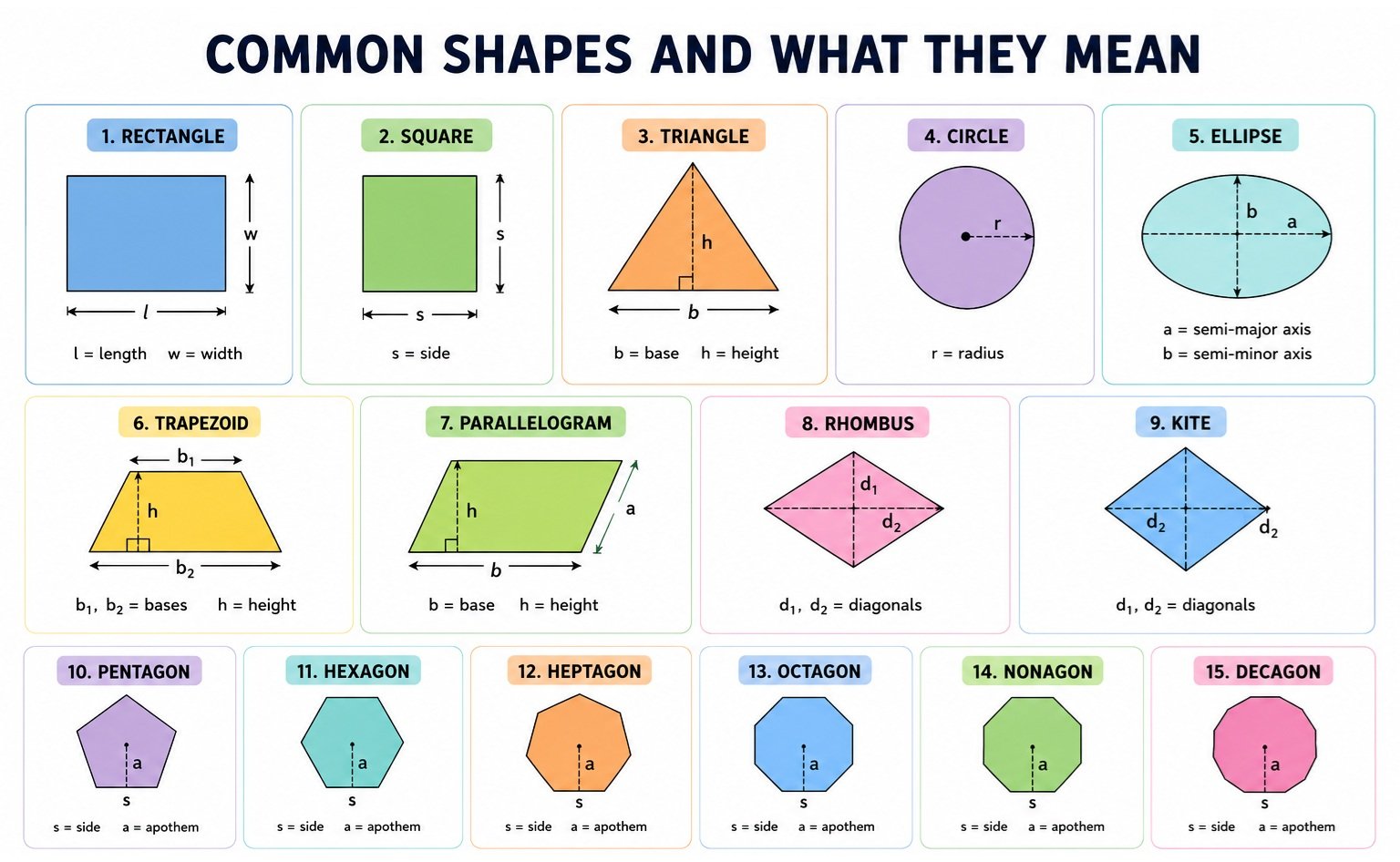
Knowing which measurement to enter is the most important step when calculating area. Different shapes require different dimensions, but each follows a specific mathematical formula. Below is an explanation of each shape, what measurements are needed, and the formula used to calculate its area.
Rectangle
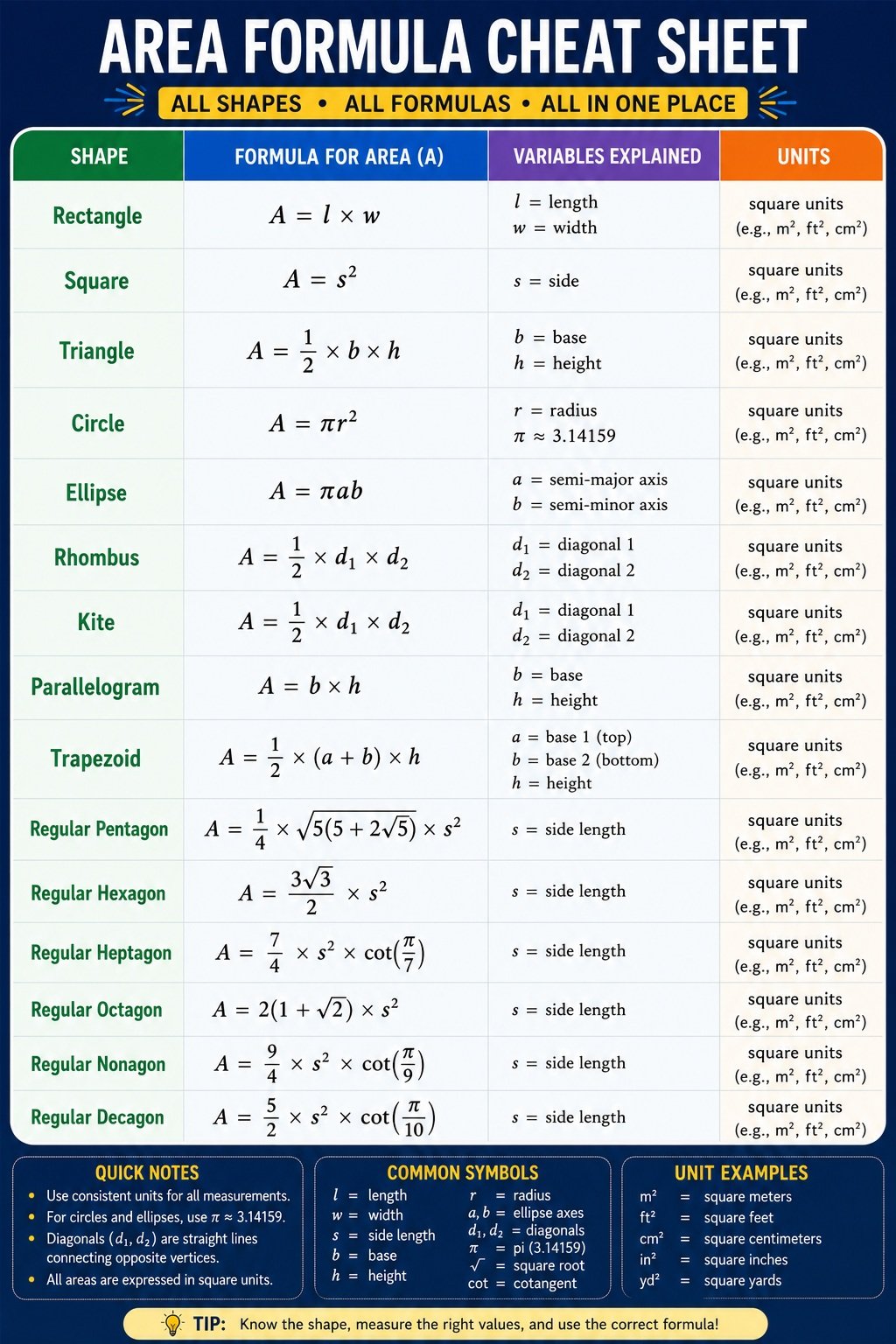
A rectangle is one of the most common geometric shapes, found in rooms, walls, floors, windows, and tables. To calculate its area, you need the width and height (or length). Multiply these two measurements together to find the total surface area.
- What You Measure: Width and Height
- Formula Used: Area = Width × Height
Square
A square has four equal sides, making it one of the simplest shapes for area calculations. Since all sides are identical, you only need to measure one side.
- What You Measure: Side Length
- Formula Used: Area = Side × Side (Side²)
Triangle
Triangles come in many forms, including right, isosceles, and scalene triangles. To determine the area, measure the base and the perpendicular height. The area is half of the rectangle that would surround the triangle.
- What You Measure: Base and Height
- Formula Used: Area = ½ × Base × Height
Circle
A circle is measured using its radius, which is the distance from the center to the edge. The mathematical constant π (pi), approximately 3.14159, is used to calculate the area.
- What You Measure: Radius
- Formula Used: Area = π × Radius²
Ellipse
An ellipse looks like a stretched circle. Instead of one radius, it has two semi-axes: the semi-major axis (A) and the semi-minor axis (B). Multiplying these by π gives the total area.
- What You Measure: Semi-axis A and Semi-axis B
- Formula Used: Area = π × A × B
Trapezoid
A trapezoid has one pair of parallel sides called the bases. To calculate its area, measure both bases and the perpendicular height between them. The area equals the average of the two bases multiplied by the height.
- What You Measure: Base A, Base B, and Height
- Formula Used: Area = ½ × (Base A + Base B) × Height
Parallelogram
A parallelogram has opposite sides that are equal and parallel. Its area is calculated by multiplying the base by the perpendicular height, similar to a rectangle.
- What You Measure: Base and Height
- Formula Used: Area = Base × Height
Rhombus
A rhombus has four equal sides, but unlike a square, its angles are not necessarily 90 degrees. The easiest way to find its area is by measuring the lengths of its two diagonals.
- What You Measure: Diagonal 1 and Diagonal 2
- Formula Used: Area = ½ × D₁ × D₂
Kite
A kite is a quadrilateral with two pairs of adjacent equal sides. Like a rhombus, its area is calculated using the lengths of its diagonals.
- What You Measure: Diagonal 1 and Diagonal 2
- Formula Used: Area = ½ × D₁ × D₂
Pentagon
A regular pentagon has five equal sides and five equal angles. Only the length of one side is needed to calculate its area using the standard geometric formula.
- What You Measure: Side Length
- Formula Used: Area = ¼ × √(5(5 + 2√5)) × Side²
Hexagon
A regular hexagon has six equal sides and is commonly seen in honeycombs and engineering designs. Measuring one side is enough to calculate the area.
- What You Measure: Side Length
- Formula Used: Area = (3√3 ÷ 2) × Side²
Heptagon
A regular heptagon contains seven equal sides and angles. The area depends on the side length and the cotangent of π divided by seven.
- What You Measure: Side Length
- Formula Used: Area = (7 ÷ 4) × Side² × cot(π ÷ 7)
Octagon
An octagon has eight equal sides and is commonly used in architecture and traffic signs. Only one side measurement is required.
- What You Measure: Side Length
- Formula Used: Area = 2(1 + √2) × Side²
Nonagon
A regular nonagon consists of nine equal sides. Its area is determined using the side length and the cotangent of π divided by nine.
- What You Measure: Side Length
- Formula Used: Area = (9 ÷ 4) × Side² × cot(π ÷ 9)
Decagon
A regular decagon has ten equal sides and ten equal angles. To calculate its area, measure the length of one side and apply the standard decagon area formula.
- What You Measure: Side Length
- Formula Used: Area = (5 ÷ 2) × Side² × cot(π ÷ 10)
Understanding Each Shape Chart
Here’s a quick rundown of what each shape does and what you need to measure:
| Shape | What You Measure | Formula Used |
| Rectangle | Width and Height | Width × Height |
| Square | Side | Side × Side |
| Triangle | Base and Height | ½ × Base × Height |
| Circle | Radius | π × Radius² |
| Ellipse | Semi-axis A and Semi-axis B | π × A × B |
| Trapezoid | Base A, Base B, and Height | ½ × (A + B) × Height |
| Parallelogram | Base and Height | Base × Height |
| Rhombus | Diagonal 1 and Diagonal 2 | ½ × D1 × D2 |
| Kite | Diagonal 1 and Diagonal 2 | ½ × D1 × D2 |
| Pentagon | Side | ¼ × √(5(5+2√5)) × Side² |
| Hexagon | Side | (3√3/2) × Side² |
| Heptagon | Side | (7/4) × Side² × cot(π/7) |
| Octagon | Side | 2(1+√2) × Side² |
| Nonagon | Side | (9/4) × Side² × cot(π/9) |
| Decagon | Side | (5/2) × Side² × cot(π/10) |
What is Area?
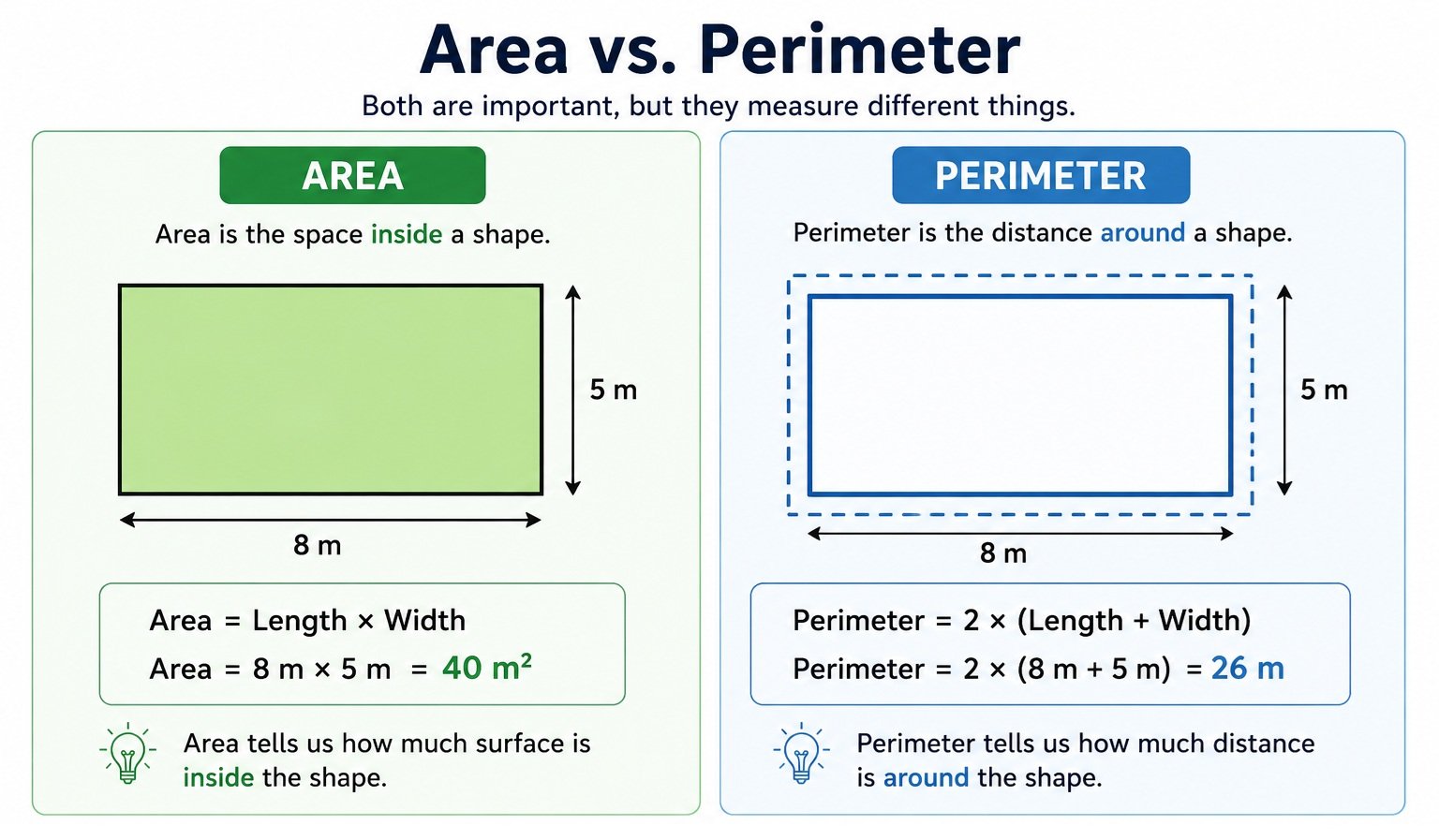
Area is the amount of space inside a flat shape or surface. It tells you how much surface is covered by an object. For example, if you want to know how much carpet is needed for a room or how much paint is required for a wall, you first need to calculate the area.
Area is one of the most common measurements used in mathematics, construction, engineering, architecture, farming, and everyday life.
Area vs. Perimeter
Many people confuse area with perimeter, but they measure different things.
| Area | Perimeter |
| Measures the space inside a shape | Measures the distance around a shape |
| Expressed in square units | Expressed in linear units |
| Used for covering surfaces | Used for measuring boundaries |
Example:
A rectangular garden measuring 10 feet long and 6 feet wide has:
- Area: 10 × 6 = 60 square feet (ft²)
- Perimeter: (10 + 6) × 2 = 32 feet
The area tells you how much grass can grow inside the garden, while the perimeter tells you how much fencing is needed around it.
Why Is Area Measured in Square Units?
Area is measured in square units because it represents a two-dimensional surface with both length and width.
For example:
- 1 square inch (in²) is a square measuring 1 inch × 1 inch
- 1 square foot (ft²) is 1 foot × 1 foot
- 1 square meter (m²) is 1 meter × 1 meter
When you multiply two lengths together, the result becomes a square unit.
Example:
- Length = 8 meters
- Width = 5 meters
Area = 8 × 5 = 40 square meters (40 m²)
Common Mistakes When Calculating Area (and How to Avoid Them)
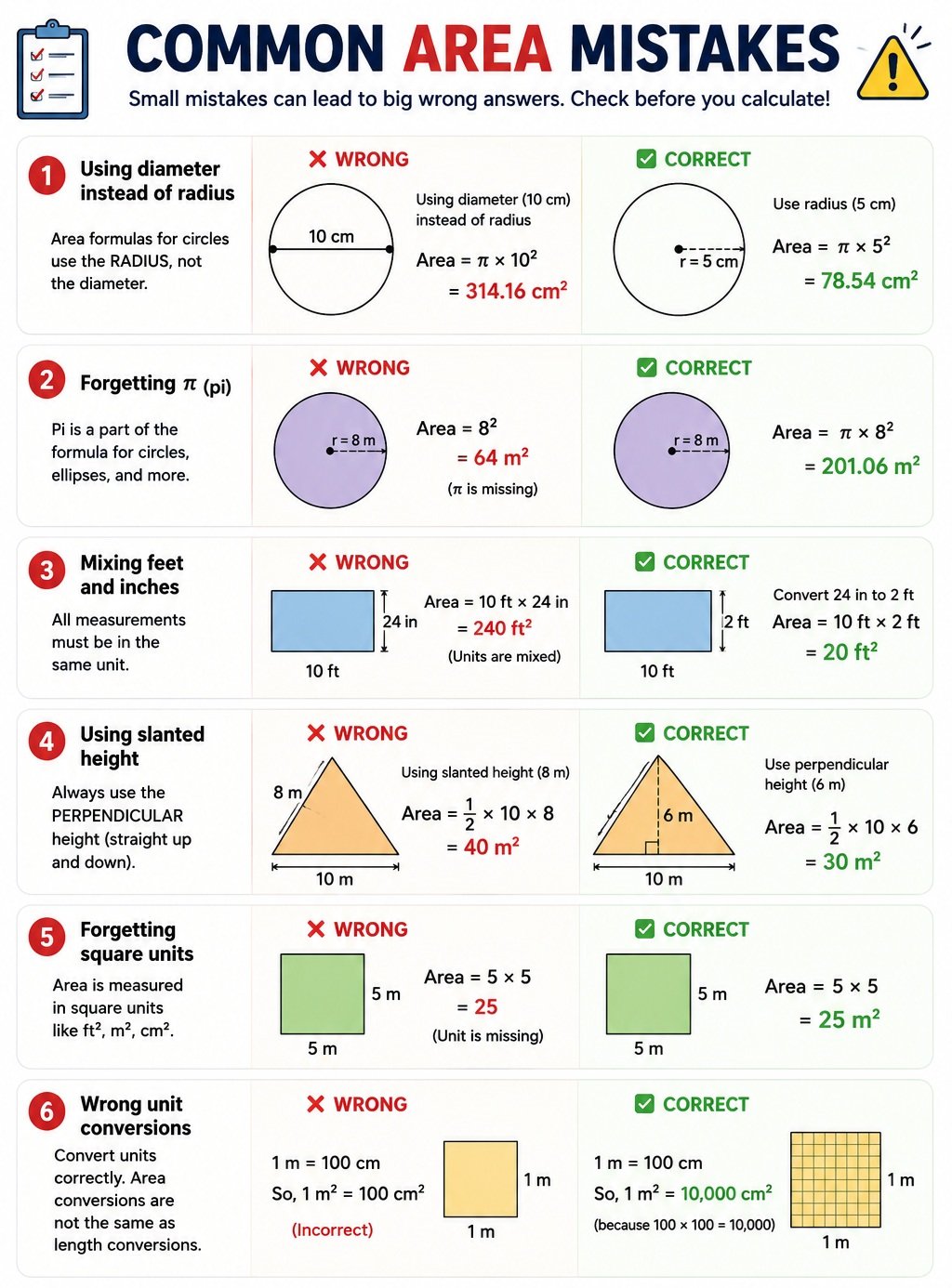
Even simple area calculations can produce incorrect answers if the wrong measurement or formula is used. Below are the most common mistakes people make when calculating the area of different shapes, along with easy-to-understand examples.
1. Using Diameter Instead of Radius (Circle)
This is one of the most common mistakes.
Incorrect
A circle has a diameter of 10 cm.
Someone calculates: Area = π × 10² = 314.16 cm² ❌
Correct
- Radius = Diameter ÷ 2
- Radius = 10 ÷ 2 = 5 cm
- Area = π × 5² = 78.54 cm² ✅
Remember: Always divide the diameter by 2 before using the area formula.
2. Forgetting π (Pi)
Some people multiply only the numbers and forget π.
Incorrect
- Radius = 8 m
- Area = 8 × 8 = 64 m² ❌
Correct
- Area = π × 8²
- = π × 64
- ≈ 201.06 m² ✅
Tip: If your calculator has a π button, use it instead of typing 3.14 for greater accuracy.
3. Mixing Inches and Feet
All measurements must use the same unit.
Incorrect
- Length = 10 feet
- Width = 24 inches
- Area = 10 × 24 = 240 ft² ❌
Correct
- Convert 24 inches to feet.
- 24 inches = 2 feet
- Area = 10 × 2 = 20 ft² ✅
4. Wrong Unit Conversion
Converting area units is different from converting length.
Incorrect
- 1 meter = 100 centimeters
- Someone assumes: 1 m² = 100 cm² ❌
Correct
- 1 m² = 10,000 cm²
- Because: 100 × 100 = 10,000
Always square the conversion factor when converting area.
5. Confusing Area with Perimeter
Area measures the space inside a shape.
Perimeter measures the distance around it.
Rectangle
- Length = 8 m
- Width = 5 m
Area = 40 m² ✅
Perimeter = 26 m
Many people accidentally report 26 as the area.
6. Forgetting Square Units
Area should always include units like:
- cm²
- m²
- ft²
- yd²
- in²
Writing only 25 instead of 25 ft² is incomplete.
Which Measurements Do I Need to Calculate Area?
Before you can calculate the area of any shape, you need to know the correct measurements. Different shapes require different inputs, and using the wrong measurement can lead to incorrect results.
For example, a rectangle needs its length and width, while a circle only requires the radius. Shapes such as a rhombus and kite use their diagonals, and regular polygons like a pentagon or hexagon require the side length and apothem.
Knowing exactly which measurements to enter makes area calculations faster and more accurate. The table below shows the required inputs for each supported shape.
Measurements Needed for Each Shape
| Shape | Measurements Needed | Notes |
| Rectangle | Length, Width | Both dimensions must use the same unit. |
| Square | Side Length | Measure one side only. |
| Triangle | Base, Height | Height must be perpendicular to the base. |
| Circle | Radius | If you know the diameter, divide it by 2 first. |
| Ellipse | Semi-Major Axis (A), Semi-Minor Axis (B) | Use half of the full width and height. |
| Trapezoid | Base 1, Base 2, Height | Height is the perpendicular distance between the bases. |
| Parallelogram | Base, Height | Use the vertical height, not the slanted side. |
| Rhombus | Diagonal 1, Diagonal 2 | Measure both diagonals from corner to corner. |
| Kite | Diagonal 1, Diagonal 2 | Both diagonals intersect at the center. |
| Regular Pentagon | Side Length, Apothem | All five sides must be equal. |
| Regular Hexagon | Side Length, Apothem | All six sides must be equal. |
| Regular Heptagon | Side Length, Apothem | Applies only to regular heptagons. |
| Regular Octagon | Side Length, Apothem | All eight sides must be equal. |
| Regular Nonagon | Side Length, Apothem | All nine sides must be equal. |
| Regular Decagon | Side Length, Apothem | All ten sides must be equal. |
Frequently Asked Questions (FAQs)
1. What is area in geometry?
Area is the amount of space inside a two-dimensional shape. It is measured in square units such as square feet (ft²), square meters (m²), or square centimeters (cm²).
2. How do you calculate the area of a shape?
The area depends on the shape. For example, multiply length by width for a rectangle, use π × radius² for a circle, and use ½ × base × height for a triangle. An area calculator automatically applies the correct formula.
3. What is the difference between area and perimeter?
Area measures the space inside a shape, while perimeter measures the total distance around the outside of the shape. Area is measured in square units, whereas perimeter is measured in linear units.
4. Why is area measured in square units?
Area is measured in square units because it represents the number of square units needed to completely cover a surface without gaps or overlaps.
5. What measurements do I need to calculate area?
The required measurements depend on the shape. Common inputs include length, width, side length, radius, height, base, diagonals, or semi-major and semi-minor axes for an ellipse.
6. How do you calculate the area of a circle?
The area of a circle is calculated using the formula A = π × r², where r is the radius. Simply square the radius and multiply it by π (approximately 3.14159).
7. Can this area calculator calculate regular polygons?
Yes. This calculator can calculate the area of regular polygons including pentagons, hexagons, heptagons, octagons, nonagons, and decagons using their standard mathematical formulas.
8. How do you calculate the area of an irregular shape?
An irregular shape can often be divided into smaller regular shapes such as rectangles or triangles. Calculate the area of each section separately and then add the results together.
9. What are the most common units used for area?
Common area units include square inches (in²), square feet (ft²), square yards (yd²), square meters (m²), square centimeters (cm²), acres, and hectares.
10. What is an area calculator used for?
An area calculator helps quickly determine the surface area of different geometric shapes. It is commonly used for flooring, painting, landscaping, construction, architecture, farming, real estate, and school math problems.
References
-
Khan Academy – Area and Perimeter
https://www.khanacademy.org/math/cc-third-grade-math/imp-measurement-and-data/imp-area/v/intro-to-area-and-unit-squares -
OpenStax – College Geometry
https://openstax.org/details/books/college-algebra-2e -
Wolfram MathWorld – Polygon
https://mathworld.wolfram.com/Polygon.html -
Massachusetts Institute of Technology (MIT) OpenCourseWare – Geometry
https://ocw.mit.edu/ -
National Institute of Standards and Technology (NIST) – SI Units
https://www.nist.gov/pml/special-publication-330/sp-330-section-2